cfd-vv-suite
Quick Start
1. Install
# From PyPI (recommended — includes all test cases, no clone needed)
pip install cfdvv

# Or from source (for development)
git clone https://github.com/vvp-cfd/cfd-vv-suite.git
cd cfd-vv-suite
pip install -e tools/

# Docker images
docker pull vvpcfd/cfdvv                          # Docker Hub
docker pull ghcr.io/vvp-cfd/cfd-vv-suite           # GitHub Container Registry
See jupyter-guide.md for the Python API reference and example/cfdvv-demo.ipynb for a runnable Jupyter notebook walkthrough.
2. Browse Cases
cfdvv list                             # all cases
cfdvv list -c verification             # verification only
cfdvv list -c validation               # validation only
cfdvv list -c verification -t 3d       # verification, 3D
3. Inspect a Case
cfdvv info poiseuille-2d       # short ID — resolves automatically
cfdvv info tools/cfdvv/cases/verification/incompressible/poiseuille-2d  # full path also works
All commands accept both case IDs and full paths.
Shows: physics, boundary conditions, mesh requirements (including recommended resolution and grids for convergence study), expected quantities, and tolerances.
4. Run Your Solver
Option A: Any solver -> CSV
- Read the case
README.mdandcase.yaml— geometry, BCs, and mesh requirements (mesh:) - Generate a mesh per the recommended resolution
- Run the simulation
- Export results as CSV:
x, y, u, v, p
0.0, 0.0, 0.0, 0.0, 1.5
Option B: OpenFOAM (ready-to-run cases)
Five cases have complete OpenFOAM directories with blockMeshDict and Allrun:
cd tools/cfdvv/cases/verification/incompressible/poiseuille-2d/openfoam && ./Allrun
cd tools/cfdvv/cases/verification/incompressible/couette-2d/openfoam && ./Allrun
cd tools/cfdvv/cases/verification/incompressible/lid-driven-cavity/openfoam && ./Allrun
cd tools/cfdvv/cases/verification/incompressible/taylor-green-vortex-2d/openfoam && ./Allrun
cd tools/cfdvv/cases/verification/compressible/sod-shock-tube/openfoam    # blockMesh + rhoCentralFoam
Using our Docker image
Pull the pre-built OpenFOAM + cfdvv image (cases are baked into the image):
docker pull vvpcfd/cfdvv-openfoam                         # Docker Hub
docker pull ghcr.io/vvp-cfd/cfd-vv-suite-openfoam          # GitHub Container Registry

docker run --rm vvpcfd/cfdvv-openfoam
Or build from the Dockerfile:
docker build -t cfdvv-openfoam -f ci/Dockerfile.openfoam .
docker run --rm cfdvv-openfoam
Option C: Generate analytical solution on your mesh
For cases with analytical solutions, use scripts/generate_solution.py:
python tools/cfdvv/cases/verification/incompressible/poiseuille-2d/scripts/generate_solution.py <nx> <ny> output.csv
python tools/cfdvv/cases/verification/incompressible/taylor-green-vortex-2d/scripts/generate_solution.py 64 output.csv
python tools/cfdvv/cases/verification/incompressible/beltrami-flow-3d/scripts/generate_solution.py 21 beltrami.csv
5. Compare Results
Verification (analytical)
cfdvv compare poiseuille-2d \
    --result my_results.csv --norm L2 --plot
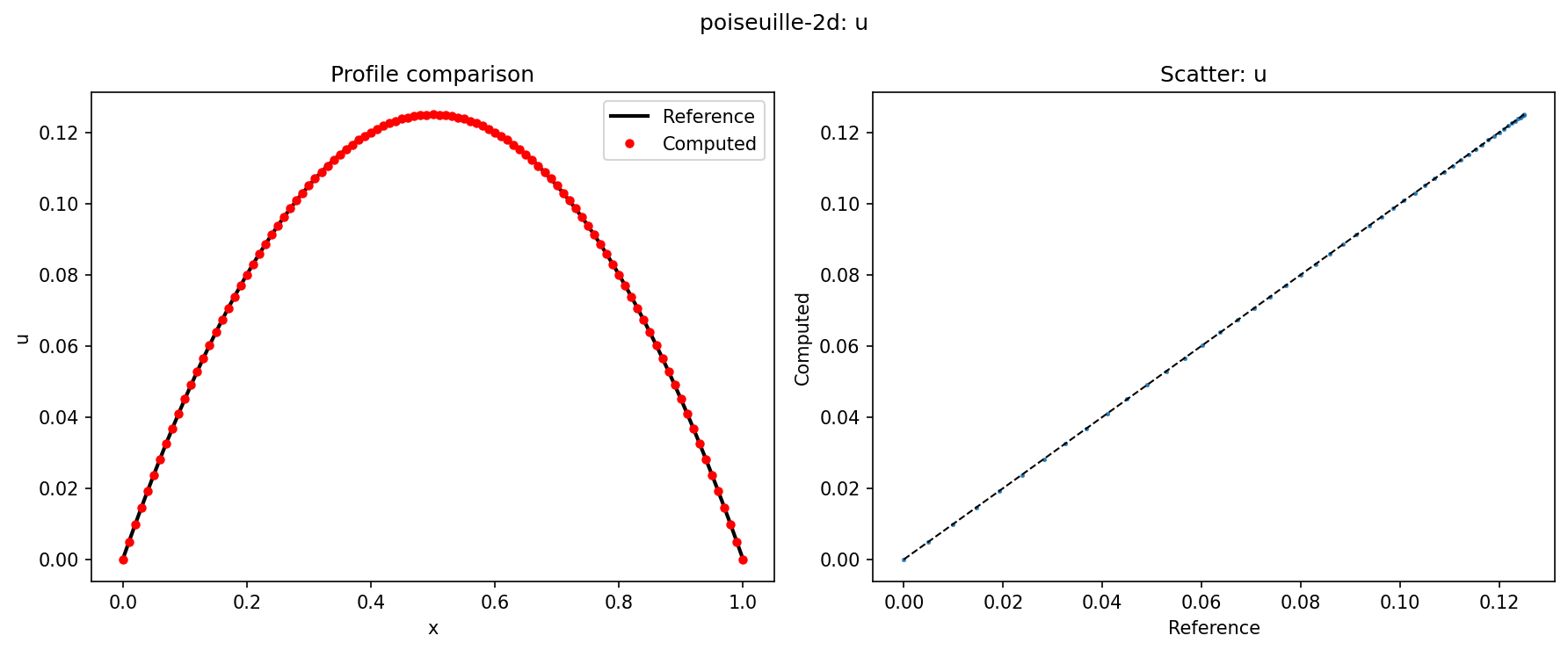
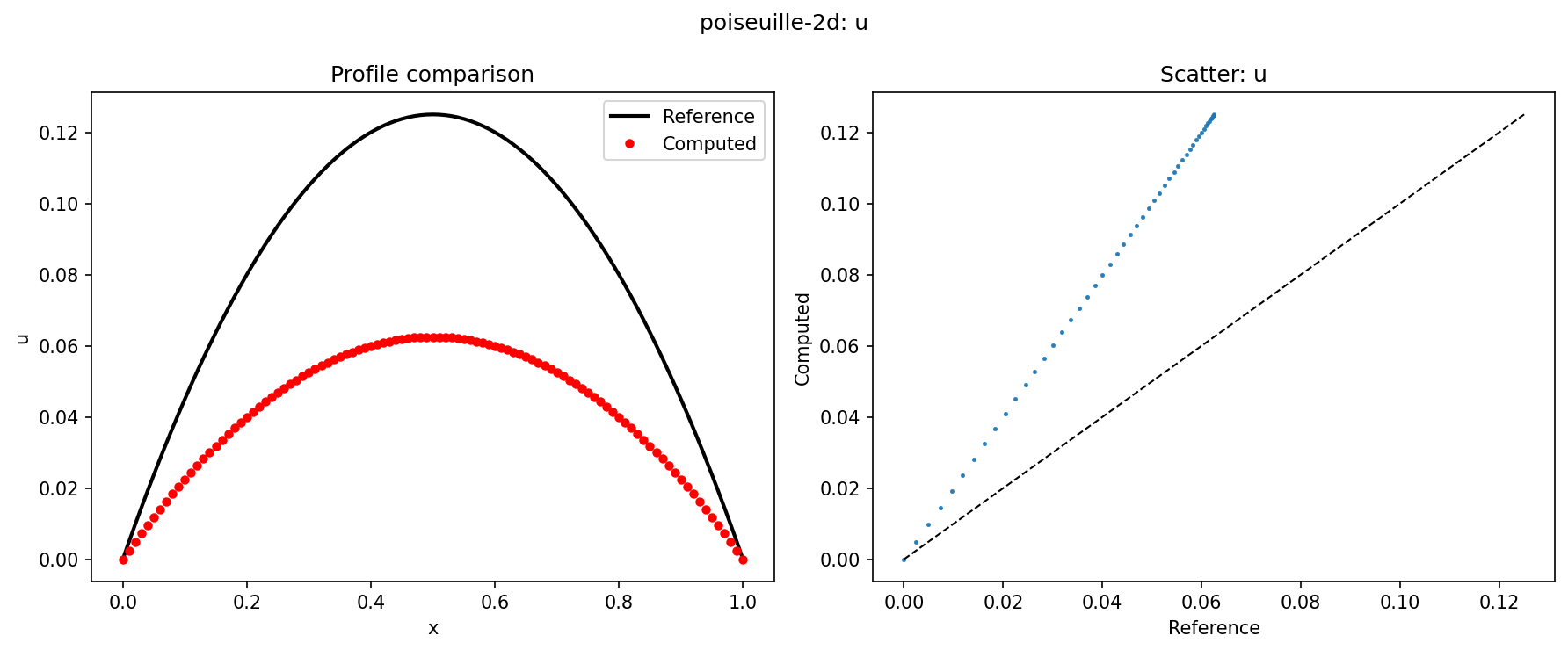
The --plot flag generates a 3-panel comparison figure for each field:
- 1D cases: reference profile (black line) vs computed values (red dots), plus a scatter plot of matched values
- 2D cases: filled scatter plots of reference and computed fields side-by-side, plus a correlation scatter
Example output for a well-matching case (poiseuille-2d, u-velocity):
And a poor match (15% noise added to trigger a FAILED verdict):
Auto-generate reference on your grid
If your grid differs from the reference, use --auto-generate:
cfdvv compare poiseuille-2d \
    --result my_results.csv --auto-generate --plot
For analytical cases, this runs scripts/generate_solution.py on-the-fly with your grid dimensions.
For MMS and experimental cases with CSV data, it falls back to nearest-neighbor matching.
Validation (experimental/DNS)
cfdvv compare cylinder-re20 \
    --result my_results.csv --norm Relative_L2

cfdvv compare channel-flow-retau180 \
    --result my_uplus_profile.csv --norm L2
Expected errors when grid mismatch occurs
When comparing without --auto-generate and your grid doesn’t match the reference:
Case: Plane Poiseuille Flow (poiseuille-2d)
Result: my_coarse_results.csv

Field           Norm         Value          Min(ref)     Max(ref)
--------------------------------------------------------------------------------
u               L2           3.270e-02     0.0000       0.1250
v               L2           1.450e-03     0.0000       0.0000

WARNING: Reference has 101 points but result has 11 points.
         Consider using --auto-generate or matching the reference grid.
         Expected L2 < 1e-6 for matching grid.
PASS/FAIL: the tolerance check compares matched points only.
6. Generate a Report
cfdvv report poiseuille-2d \
    --result my_results.csv --output report.html
The report is a standalone HTML file containing:
- Case metadata (physics, geometry, reference source with DOI links)
- Comparison table with all error norms (L1, L2, Linf, Relative L2)
- Embedded comparison plots for each field
- PASSED / FAILED badge with color coding
- Case parameters with descriptions
- No external dependencies — open in any browser
Example outputs (open in your browser):
- report-good.html — PASSED (good_poiseuille.csv, all errors zero)
- report-bad.html — FAILED (bad_poiseuille.csv, noisy data)
For validation cases:
cfdvv report channel-flow-retau180 \
    --result my_uplus.csv --output channel_report.html
7. Grid Convergence Study (GCI)
GCI (Grid Convergence Index) estimates how far your solution is from the asymptotic (infinite-mesh) value, based on Roache’s uniform reporting methodology (ASME V&V 20).
Requirements
- At least 3 mesh levels with constant refinement ratio (typically r = 2)
- The same quantity evaluated on each mesh (e.g., L2 norm of a field)
- Meshes must be in the asymptotic convergence range (p should be approximately constant)
Typical workflow:
# Run your solver on 3 meshes, export results
cfdvv compare poiseuille-2d -r coarse_results.csv   # Note the L2 value
cfdvv compare poiseuille-2d -r medium_results.csv
cfdvv compare poiseuille-2d -r fine_results.csv

# Then compute GCI
cfdvv gci poiseuille-2d -r coarse_results.csv -r medium_results.csv -r fine_results.csv
Real example using three grids (6, 11, and 21 points) against the Poiseuille analytical solution:
cfdvv gci poiseuille-2d \
    --results gci-coarse.csv --results gci-medium.csv --results gci-fine.csv \
    --mesh-sizes 0.05,0.025,0.0125
Output:
GCI Analysis for: poiseuille-2d
Mesh sizes: [0.05, 0.025, 0.0125]
Refinement ratios: [2.0, 2.0]

  Quantity 0 (u-field L2 error):
    f1 (coarse) = 0.00363335
    f2 (med)    = 0.00090830
    f3 (fine)   = 0.00022690
    Order p     = 2.00
    Extrapolated = 0.00454193
    GCI         = 0.312583
Key observations:
- p ≈ 2.0: confirms 2nd-order convergence (expected for linear interpolation / 2nd-order schemes)
- GCI ≈ 0.31: the fine-mesh error is about 31% of the coarse-grid error estimate — reasonable asymptotic ratio
- Error ratio: each mesh halving reduces error by ~4× (h² convergence)
The example CSVs used above are available in tools/tests/integration_data/.
See comparison-methodology.md for full mathematical details.
Case Directory Structure
poiseuille-2d/
+-- case.yaml               # Metadata (includes mesh: requirements)
+-- README.md               # Physics, geometry, boundary conditions
+-- reference/              # Reference data (CSV)
|   +-- analytical/
+-- openfoam/               # Ready-to-run OpenFOAM case (selected cases)
|   +-- Allrun
|   +-- system/
|   +-- 0/
+-- scripts/                # Solution generation scripts (selected cases)
|   +-- generate_solution.py
+-- geometry/               # Geometry (STEP/STL)
+-- meshes/                 # Pre-built meshes
Built-in OpenFOAM Cases
| Case | Solver | Mesh | Script |
|---|---|---|---|
poiseuille-2d |
icoFoam | blockMesh (10x20) | Allrun |
couette-2d |
icoFoam | blockMesh (8x16) | Allrun |
lid-driven-cavity |
icoFoam | blockMesh (32x32) | Allrun |
taylor-green-vortex-2d |
icoFoam | blockMesh (64x64) | Allrun |
sod-shock-tube |
rhoCentralFoam | blockMesh (200x1) | blockMesh + run |
For all other cases — see mesh: in case.yaml for grid requirements and scripts/generate_solution.py for analytical generation.